
Skip to content
Scryr

Scryr — See the world your AI creates

Scryr

Actionable Architecture

Enter the World Discover why

Add a dimension
to diagnose

Scroll to change your perspective

Try it Out

Start with your repository.

  • Install with Homebrew:brew install scryr-app/tap/scryr
  • Copy the prompt into your coding agent to create an index.scry file.
  • Review the file, then run scryr serve from your repository.
Install locally

Go straight to the map.

  • Log in to Scryr with your GitHub account.
  • Open a sample architecture in the cloud.
  • Modify the sample to make it your own.
Log in to Scryr

Why do software diagrams
Look Like 1995?

Your agent just changed twelve services.

▧ architecture_final_FINAL_v7.mmd
File   Edit   View   Help
graph TD
  Web --> API
  API --> DB
  API --> Cache
  API --> Queue
  Queue --> Worker
  Worker --> DB
  Worker --> API
  Web --> Auth
  Auth --> API
A deliberately retro Mermaid-style flowchart: Web, API, database, cache, queue, worker and authentication, tangled together.WebAPIDBCacheQueueWorkerAuth
Ready.   Context: not found. INS

Here’s a rectangle.Another One.

Yay?

Your architecture diagram should do things for you and your agents.

Generate Diagrams from
Typed Python Code.

Give it a repository. Ask for index.scry.
Turn its understanding into something you can examine.

✧ index.scryTyped Python
from scryr import Diagram, Info, Manifest
from scryr.types import ProgrammingLanguage

cache = Manifest(name="northwind_redis")
api = Manifest(
    manifest_id="services/api",
    name="nwapi",
    connections=[cache],
    info=Info(
        language=ProgrammingLanguage.python,
        owner_team="Platform",
    ),
)

commerce = Diagram(
    name="Northwind Commerce",
    manifests=[api, cache],
)
ImportsTypesConnectionsOwnership
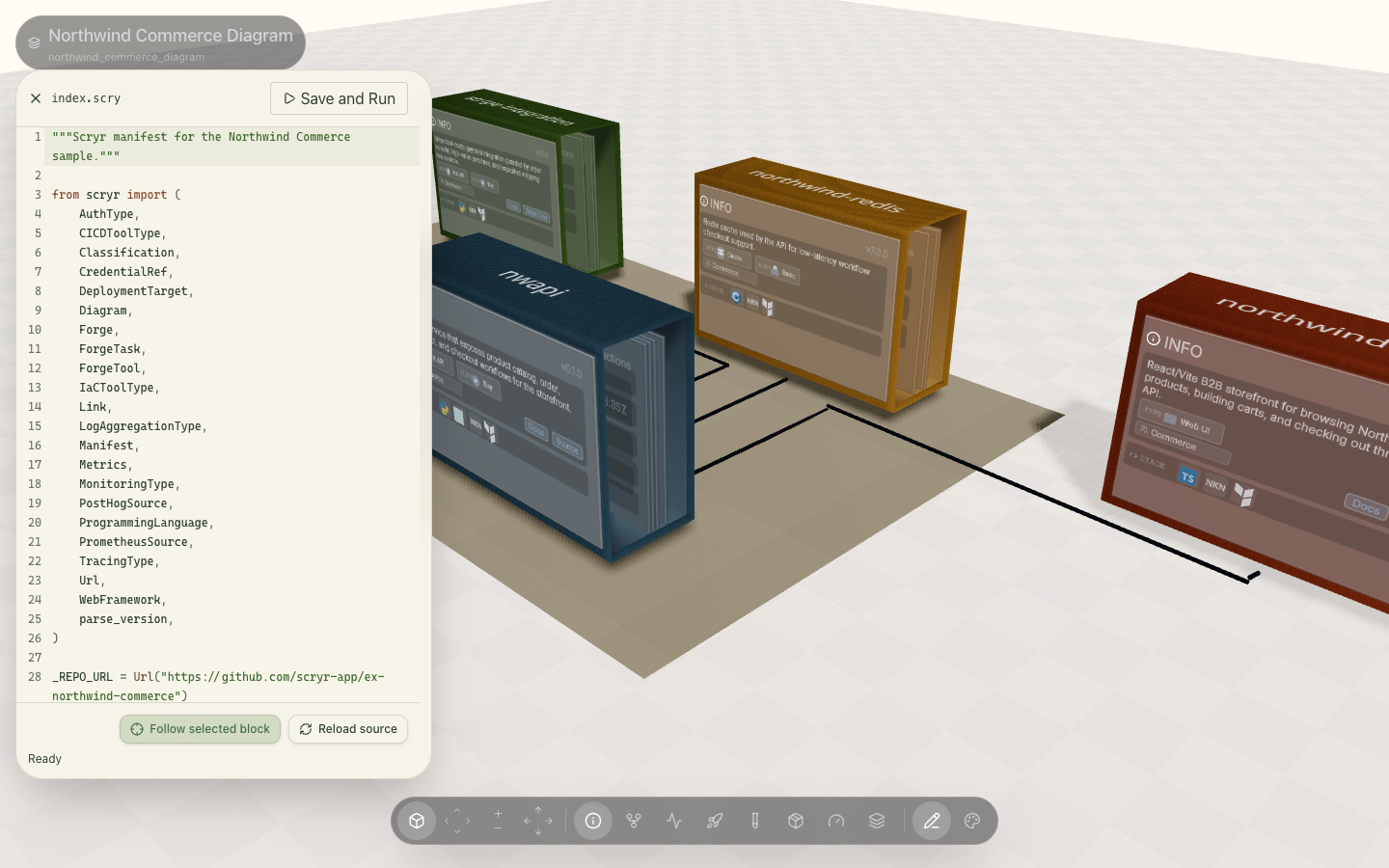
Actual Scryr product with index.scry open beside the Northwind Commerce architecture map
The source and its world, side by side. Actual Scryr product

Find the service.
Follow the context.

Trace connections. Open a component’s Info card for its stack, owner, docs, and source.
Keep the architecture beside you while you change the code.
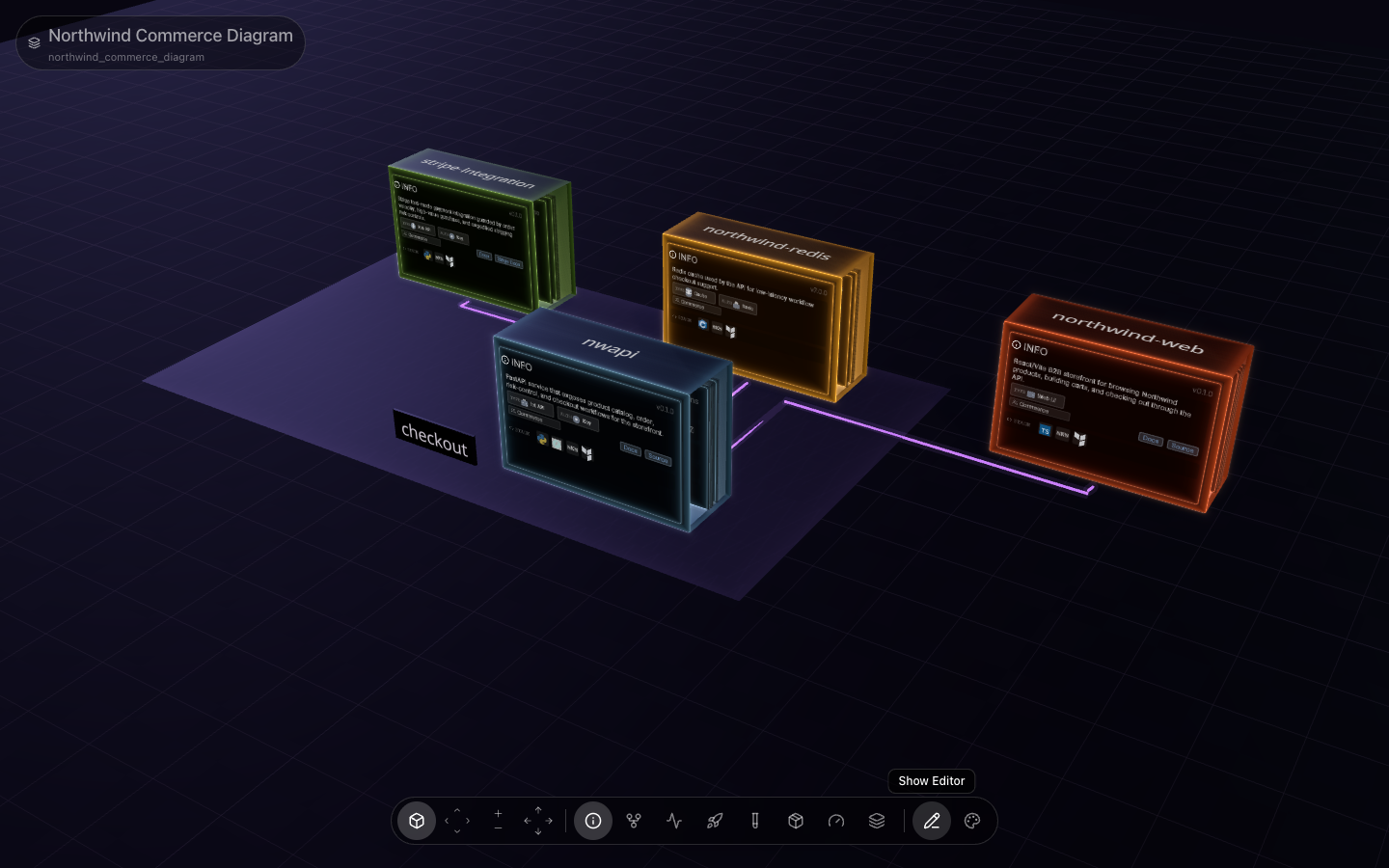
Scryr’s Northwind Commerce diagram: API connected to Redis, Stripe, and the web app, with Info cards and Docs and Source links
Northwind Commerce in ScryrConnected services with their Info cards visible.

Review the model as you edit.

Check types and diagram references, then open the local map. Watch mode rebuilds it when your manifest changes.

Local developmentterminal
$ scryr check
$ scryr serve --watch
Run your own map

A service is more
than its name.

Connect test results and runtime evidence to each service.
Reuse the same architecture model in your own tools.

Did this service pass?

Publish JUnit results and completed GitHub Actions runs. See pass/fail counts and workflow status in the diagram.

Connect CI evidence
Report completed runsterminal
$ scryr report tests --manifest api \
    --run-id "$GITHUB_RUN_ID" \
    --observed-at "$RESULTS_COMPLETED_AT"
$ scryr report actions --manifest api \
    --event-file workflow-run.json --branch main

What’s happening at runtime?

Open a component’s provider-backed snapshot. Run its named query from the CLI and export JSON for a script or investigation.

Connect runtime metrics
Query the same sourceterminal
$ scryr query --list
$ scryr query requestRate --manifest api
$ scryr query requestRate --manifest api \
    --json > request-rate.json

What can your tools build from it?

Export Scryr’s JSON Schema to power code generation, editor tooling, validation, and CI checks from the same typed model as your map.

Inspect the model
Inputs for your own toolingterminal
$ scryr export json > architecture.json
$ scryr inspect schema > scryr-schema.json

Declare the tools.
Export the setup.

A Forge keeps tool versions and tasks in your architecture manifest.
Generate the files a developer needs to work on the system.

Developer environmentindex.scry
from scryr import Forge

local = Forge(
    name="Developer environment",
    tools={"python": "3.14", "postgres": "17"},
    tasks={"test": "pytest"},
)
From the same Forgeterminal
$ scryr export mise \
    --forge "Developer environment" > mise.toml
$ scryr export compose \
    --forge "Developer environment" > compose.yaml
$ scryr export devcontainer \
    --forge "Developer environment" > devcontainer.json

mise.tomlTool versions and runnable tasks.

compose.yamlLocal services, including PostgreSQL and Redis.

devcontainer.jsonA container workspace with editor extensions.

Build your development environment

Make Your Diagram
Do More.

Install locally Log in to Scryr

Open source · MIT licensed · Local-first

Explore the source ↗